Happy New Year!

On December 30, 2009, in Computer Matters, by Frederick

It’s the end of another year and the end of a ground-breaking decade. Let’s look back at what’s been accomplished in the years of 2000–2009, focusing on technology.

Technology

Windows has entered a new era

The decade—indeed, the century—began with Windows 2000, which I consider the first great version of the operating system. XP was the version that brought widespread success, and people just seem to refuse to upgrade; even today, almost three quarters of the computers on the net are on XP.

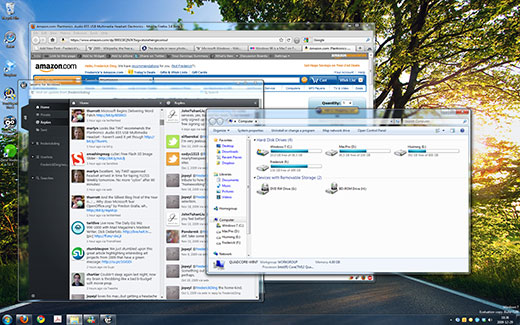
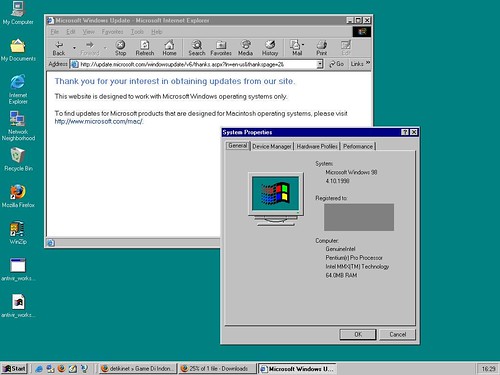
Despite the dismal failure of Windows Vista, it too brought change, which was followed by the enhancements of Windows 7. Compare my desktop today to the ugly screens of a decade ago:


Microsoft Store
Windows 98 desktop screenshot

Apple deserves an honourable mention for the ground-breaking work they’ve done on the Mac, elevating it to a newly trendy status.

Portable media players have completely changed

A decade ago, CD players and tape-based Walkmans were still the norm for ‘portable’ audio players. The iPod, launched in 2001, entirely changed the game. (I suppose this and the iPhone were the “comeback of the decade”.) It was no longer a device that played removable media. That was followed by thousands of other portable media players, to which the public generally refers inaccurately as “MP3 players”, reflecting the popularity of the 15-year-old MP3 format that has also been notorious for illegal file sharing (see below).

Cell phones and mobile devices have become ubiquitous

These devices used to be ugly, huge and heavy objects. As we move into 2010, cell phones have become more compact (usually this means thinner and lighter) and more powerful.

In China, about 739 million people have cell phones; that’s more than there are Internet users in China (which is about 360 million).

Mobile devices have become truly powerful. The iPhone, purportedly the most popular cell phone of 2009, is one of the biggest platforms for software development. And it has a touch screen. RIM’s BlackBerry, initially launched in 1999, is the most popular smartphone among business users.

Ordinary people begin to embrace ultra-portable netbooks for lightweight computing. The move to mobile is probably the most noticeable trend in end-user gadgetry in this decade.

Continue reading »

Tagged with:
 

Browsers on Windows 7

On June 14, 2009, in Computer Matters, by Frederick

A few days ago I completely reinstalled the operating system on my computer in order to upgrade from the Windows 7 Beta to the Windows 7 Release Candidate. In doing so, I had to manually reinstall all of my applications, including the various browsers to which I am accustomed — Mozilla Firefox (3.5 Beta 4), Google Chrome (dev branch), and Safari 4 (now no longer beta) in addition to the built-in Internet Explorer 8, which I seldom use.

I am also accustomed to my taskbar being set in “Combine when taskbar is full” mode, which is a compromise between the dock-resembling Windows 7 taskbar and the older taskbar style with which XP and Vista users would be familiar. This looks something like this:

An alternative taskbar look for Windows 7

An alternative taskbar look for Windows 7

Today, I decided to see if I could get accustomed to the Windows 7 taskbar look, which involves taking out those labels and showing merely the icons. Screenshot by Paul Thurrott:

The default Windows 7 taskbar style

The default Windows 7 taskbar style

This is when I discovered something cool yet shocking about my browsers.

Firefox in the taskbar

Firefox in the taskbar

Mozilla Firefox is a nice browser; that’s why I use it most of the time. Google Chrome is lightweight, fast, and aesthetically pleasing; that’s why it’s my default browser.

But neither of them seem aware of Windows 7. Their browser icons are plainly represented in the taskbar, even when I’ve got multiple tabs open. In the screenshot to the right, Mozilla Firefox only gets one taskbar thumbnail when I mouse over the icon, even though I have 4 tabs open. The icon, too, doesn’t reveal anything about how many tabs are open.

Chrome has the same issue

Chrome has the same issue

With Google Chrome, the exact same thing happens. The thumbnail is one of the application, not the individual tabs open, so it would appear that Windows 7 isn’t aware of the individual tabs nor is Chrome taking advantage of the new taskbar.

Internet Explorer has no issue with this; as soon as more than one tab is opened, the taskbar reflects this change. Note: the same change occurs for Chrome and Firefox if multiple WINDOWS are opened.

Windows 7 recognizes tabs in Microsoft's browser

Windows 7 recognizes tabs in Microsoft's browser

The shocking thing is, Apple’s new browser takes advantage of the taskbar. Perhaps one expects this from a company that focuses on user experience and aesthetics. But this just makes Safari awesome.

The taskbar actually recognizes the individual tabs in Safari 4

The taskbar actually recognizes the individual tabs in Safari 4

You’ll notice that the thumbnails aren’t of the browser, but of the individual pages loaded in tabs. This means that I can click on a thumbnail to go directly to that tab — an excellent convenience, thanks to the Windows 7 taskbar.

I’m very surprised that Mozilla Firefox and Google Chrome, two of the most common browsers among people who are on the cutting edge of software technology, aren’t taking advantage of Windows 7′s new taskbar. After all, according to Wakoopa (which tracks software usage), Firefox and Chrome are the 1st and 3rd most used browsers on Windows. Come on, Mozilla developers, make your browser more Aero-aware and taskbar-aware! Even Chrome looks nicer on Aero Glass by default.

Chrome looks really attractive with an Aero Glass interface

Chrome looks really attractive with an Aero Glass interface

Taskbar thumbnails are really useful when the taskbar items don’t have labels and when the icons are combined. It’s no longer necessary to read the labels to determine which item to click on; I can just mouse over, quickly scan over the thumbnails, and click on the one I want. Kudos to the people at Microsoft who came up with this intuitive interface!

If you’re still on Windows XP — noting that it is nearly 8 years old — or on Vista, Windows 7 is a major step up in terms of the user interface. It might take a bit of adjusting, but in the end, I am certain you’ll like it.

Microsoft Store

Tagged with:
 

Star Trek movie

On April 30, 2009, in Video Matters, by Frederick

The 11th movie in the Star Trek franchise is being released in theatres on May 8, 2009. If there is a single film in this year that I definitely wish to see, it is this one.

YouTube Preview Image

High definition trailers may be found on Apple’s Web site (requires QuickTime).

Tagged with:
 

The Thing with Fonts

On March 28, 2009, in Computer Matters, Graphic Matters, by Frederick

I love fonts… well, I love some fonts to a great extend and vehemently despise others. I don’t consider myself a typographer — and I don’t make fonts — yet I probably have a keener eye for type than the average citizen. And my documents typically reflect the period of my life in which they were produced, because, well, I have favourite fonts… and these preferences change about every year.

The thing with fonts is that they contribute greatly to the overall feel of any production, whether it’s a logo or corporate identity, a book, a newspaper/magazine, an essay, or an advertisement. Choosing the right typeface for a particular purpose is like an art, and typography itself is an art. Unfortunately, most average Joes lack awareness and skill in this area.

To test your ability, see if you recognize the fonts below; click on the image to see the answers. (Windows users should have no problem with these.)

You know these fonts

You know these fonts

Continue reading »

Tagged with:
 

What We Want in 2009

On December 20, 2008, in Personal Matters, by Frederick

What do we hope to see in 2009? I mean this both personally, and in reference to our society as a whole. 2009 In this post, I am going to talk first about technological expectations, then some of the other societal changes that I expect, followed by a more personal section.

Continue reading »

Tagged with:
 

“Better” Microsoft commercials?

On September 19, 2008, in Computer Matters, by Frederick

A few days ago I posted about the un-funny Bill Gates + Jerry Seinfeld commercials.

Now they’ve released a new set of commercials that do promote Windows, and they are a bit more effective.

YouTube Preview Image

YouTube Preview Image YouTube Preview Image

The only thing I’m confused about is: if Windows is the product that is being promoted (as one can tell from the logo shown at the end of each commercial) why are they promoting “PC’s” as opposed to Windows? I can understand why Apple would promote the Mac over the PC (as they produce hardware & software and it’s the combination that is being marketed), but not why Microsoft is using the term PC, which is not a Microsoft product nor a Microsoft innovation. Perhaps it’s just because Microsoft doesn’t perceive Linux and other PC operating systems as a threat.

Anyhow, I invite you to vote on this poll. Choose “Yes” or “No”, and also choose the reason closest to yours.

Tagged with:
 

I recommend H.264

On August 26, 2008, in Video Matters, by Frederick

I’m a fan, user and promoter of the H.264 (also known as the MPEG-4 Advanced Video Coding) codec. It’s an excellent standard which provides great quality at low(er) bitrates while supporting true High Definition resolutions such as 1080p (1920×1080).

It is the flagship format of Apple QuickTime and also used by large studios on many Blu-ray releases. Virtually all of the modern personal computers in use at this time support the format or are capable of supporting it:

  • Adobe Flash Player 9 is capable of playing H.264 content
  • the free QuickTime Player media software supports it
  • QuickTime Pro supports exporting to H.264, thus iMovie HD and other QuickTime-based products can use it
  • professional video editing software like Adobe Premiere Pro and Final Cut Pro support exporting to H.264
  • the open source FFmpeg project supports H.264
  • open source media players such as VLC Media Player and mplayer support H.264

Unfortunately, Microsoft does not support it at this time, favouring — instead — their own non-open VC-1 codec for HD content and Silverlight.

Continue reading »

Tagged with:
 

Unveiling the (original) Macintosh

On July 21, 2008, in Video Matters, by Frederick

I recently found this video of Steve Jobs unveiling the Macintosh in 1984. It’s a very interesting video to watch, particularly 24 years later.

Still, it’s not hard to believe that this amazing machine was such an important milestone.

Please enable Javascript and Flash to view this Flash video.

Can you believe Bill Gates claimed credit for inventing the Personal Computer?

If you like this, you should rate the post/video (thumbs up), leave a comment, bookmark this post, and/or check out the Apple iMac 20-inch 2.4GHz Intel Core 2 Duo.

Tagged with: