
Browse > Home /

Friday, March 12, 2010 | Subscribe via RSS

Happy New Year!

December 30th, 2009 | 1 Comment | Posted in Computer Matters

It’s the end of another year and the end of a ground-breaking decade. Let’s look back at what’s been accomplished in the years of 2000–2009, focusing on technology.

Technology

Windows has entered a new era

The decade—indeed, the century—began with Windows 2000, which I consider the first great version of the operating system. XP was the version that brought widespread success, and people just seem to refuse to upgrade; even today, almost three quarters of the computers on the net are on XP.

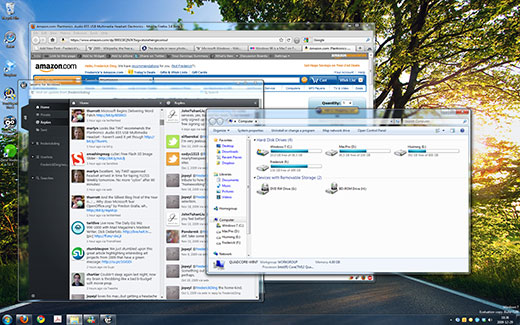
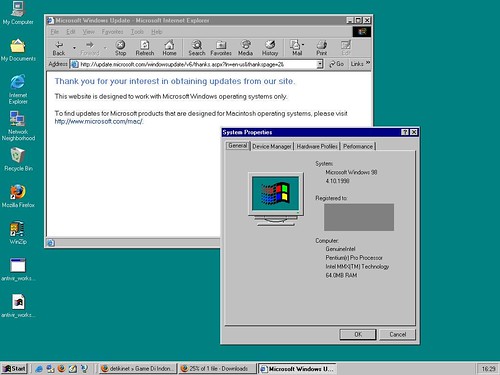
Despite the dismal failure of Windows Vista, it too brought change, which was followed by the enhancements of Windows 7. Compare my desktop today to the ugly screens of a decade ago:


Microsoft Store
Windows 98 desktop screenshot

Apple deserves an honourable mention for the ground-breaking work they’ve done on the Mac, elevating it to a newly trendy status.

Portable media players have completely changed

A decade ago, CD players and tape-based Walkmans were still the norm for ‘portable’ audio players. The iPod, launched in 2001, entirely changed the game. (I suppose this and the iPhone were the “comeback of the decade”.) It was no longer a device that played removable media. That was followed by thousands of other portable media players, to which the public generally refers inaccurately as “MP3 players”, reflecting the popularity of the 15-year-old MP3 format that has also been notorious for illegal file sharing (see below).

Cell phones and mobile devices have become ubiquitous

These devices used to be ugly, huge and heavy objects. As we move into 2010, cell phones have become more compact (usually this means thinner and lighter) and more powerful.

In China, about 739 million people have cell phones; that’s more than there are Internet users in China (which is about 360 million).

Mobile devices have become truly powerful. The iPhone, purportedly the most popular cell phone of 2009, is one of the biggest platforms for software development. And it has a touch screen. RIM’s BlackBerry, initially launched in 1999, is the most popular smartphone among business users.

Ordinary people begin to embrace ultra-portable netbooks for lightweight computing. The move to mobile is probably the most noticeable trend in end-user gadgetry in this decade.

Illegal file sharing has emerged

I don’t personally think of torrenting itself as a major problem, and it’s difficult to sympathize with big companies when the RIAA is being stupid. At the same time, it’s pretty easy to see how having hundreds of movies, TV shows and music albums distributed through torrents can take away from earnings for content producers. (Some dispute this and argue that those who pirate movies and TV shows are those who will purchase related memorabilia or boxed sets.)

In any case, it is virtually undisputed that new technologies have made distribution of such content much easier. In the previous decade, pretty much everyone was on dial-up Internet and only the students at universities with blazing connections were able to do it (think about the controversial Napster).

The best known site for illegal content

YouTube happened

YouTube and hundreds of other video sites have revolutionized the way we watch video. What used to be distributed on tapes and discs has moved onto the Internet in a way that allows ordinary folks—not videophiles or geeks—to share their multimedia with the world.

YouTube is also the icon of the so-called Web 2.0, which is oriented on user-generated content. (Flickr deserves an honourable mention for high quality pictures, just like Vimeo for high class videos.) It has made it possible for teens with crazy personalities and high-pitched edited voices, artists who post music videos, and crazy dancers who travel the world to reach out to a vast audience. Above all, it’s a legitimate new form of entertainment.

Following the success of online video, major content producers began to license music for online distribution (think Pandora or Last.fm, not to mention Internet radio) as well as movies and TV shows (think Hulu).

YouTube Preview Image

Open source projects have become worthy challengers

Spread Firefox Affiliate Button More than a decade ago, in 1996, the Apache HTTP server became the most popular web server in use; today it has surpassed 100 million web sites served.

Mozilla Firefox, having risen out of the ashes of the Netscape browser, although not the most widely used browser in the world (it’s 2nd), is apparently used by 32% of the market analyzed by StatCounter.

While I still use Microsoft Office, OpenOffice.org is also a notable alternative to the proprietary and dominant office suite, especially on non-Windows operating systems.

And then there are the programs used by geeks, like the Eclipse IDE or Aptana Studio, that are depended upon. (For all of you multimedia geeks, there are open source programs that do the job much better than their closed source counterparts; think about Handbrake, VLC…)

Businesses can now also depend on open source projects like Sugar CRM that build their revenue model around support and premium features.

News has moved onto the Web

My primary news source  now is the Web. Google News is one of my frequently visited sites, as it is a fantastic aggregator of headlines. I subscribe to e-mail summaries from the Toronto Star and breaking news alerts from the New York Times. ArsTechnica and TechCrunch are my sources for technology-related news, and occasionally Mashable and Neowin. Those pesky short links in the tweets of people I follow also make for engaging news articles.

Wikipedia happened

At the beginning of this decade, I was researching in books and print encyclopedias. The conventional wisdom today of “just Google it” didn’t work so well then. And certainly there wasn’t a Wikipedia for the wealth of human knowledge that it now contains.

Today, I can near-instantly read up on the history of Wal-Mart or read up on the Beslan school hostage crisis and its media coverage. If I truly need it, Wikipedia connects with Wikisource, the free library and Wikibooks where I can read Anna Karenina online (and I wouldn’t, because Constance Garnett’s translations are really lacking).

It’s truly amazing that the sum of all human knowledge can be collaboratively archived and updated through the likes of Wikipedia. Perhaps they need your support this holiday season!

What do you think? Did I miss out on something big that happened in this decade in the world of tech? Write a comment!

(I did, however, intentionally exclude social networking—i.e. Facebook—because I don’t think it’s been revolutionary in any major way. Sure, it has connected people in new ways, but it’s still relatively fresh and more time is needed to see where it goes. Similarly, I omitted touch because it hasn’t entirely caught on yet; tablet PCs were a dismal failure a few years ago and I haven’t yet seen their widespread success. Furthermore, I omitted cloud computing because it doesn’t directly affect a large number of people. Feel free to disagree with me in the comments.)

Worldly Matters

I think September 11, 2001 marked the start of a new era of warfare and international affairs. The terrorist attacks, inasmuch as they have been abused to justify ill-advised battles, did shock the world.

World Trade Center Attacked

I recommend you head over to the Big Picture where you’ll be dazzled by splendid photos of this decade, including commentaries on the World Trade Center attacks and war. And dozens of other things like natural disasters (remember Katrina, or the Sichuan earthquake?), the Beijing Olympics, and terrorist attacks in London.

2009 has been a fantastic year. I look forward to the future.

Chinas celebrates 60th Anniversary with miitary parade in Beijing.

Happy holidays and all the best in 2010!

Introducing Dropbox

October 3rd, 2009 | Comments Off | Posted in Computer Matters

Syncing files across computer has never been easier. Dropbox is one of the leading services in this field, with 2 million users and growing.

Free 2GB cloud storage

As a free user, you get 2 GB of space to start, and files in those 2 GB will be synced not only to your other computers, but also to the cloud. You can access those files anywhere you can open up a browser to the Dropbox Web site, and you can even share links to files in your Public folder to help collaboration with others.

PCs, Macs, Linux and the iPhone

The desktop software works on PCs, Macs and Linux machines; updates with great improvements come out often. For example, some of the recent versions of the software added LAN syncing, which speeds up the sharing of files between computers on the same network by connecting directly to one another instead of uploading and downloading from their servers in the cloud. Moreover, there’s now a Dropbox app for the iPhone that syncs your files on the go.

Free extra 250 MB

Try it out for free; there’s no cost to getting started. You can get a free account (2 GB) with 250 MB as a gift from me for signing up. Reliable sync and backup has never been easier.

I give up

September 25th, 2009 | 1 Comment | Posted in Computer Matters

I absolutely give up on writing about the Technical Preview for Office 2010. I’ve simply had way too many problems with it over the past two months of testing. Word’s typographic features are admirable, but I’ve seen a TON of the issues; anything from Word taking the content from a text box and showing/printing it in a different text box, and random crashes that occur when moving shapes around. Strangely, too, a Word 2010 document with an embedded font loses about 30% of its file size when re-saved in Word 2007.

There is reasonable hype about Office 2010, but I don’t recommend using pre-release versions — at least until a new one comes out — and I will also be uninstalling and going back to Office 2007. (I’ll note, of course, that I’m usually a bleeding edge software user who ignores the warnings that “pre-release software is unsafe for production use”. Windows 7 RC is my main machine’s operating system, I’m using the dev channel of Google Chrome, and I use pre-release versions of Firefox.)

In short, I’m not going to write any more about my experiences with the Technical Preview.

Office 2010 Technical Preview: Part 2

July 20th, 2009 | 2 Comments | Posted in Computer Matters

See Part 1 if you haven’t read it for some background. In this post:

I’ve had about 4 days now to play with the Office 2010 Technical Preview, which, according to Ars Technica, is actually a slightly older build than the most current one, and for which testers were “hand-picked”.

I did end up installing both the 32-bit and the 64-bit editions of the software, realizing that I wanted to see whether 64-bit was stable (and it seems to be). When I discovered that Office 2010’s PDF export functionality is terribly inferior to Adobe Acrobat (more on that later), I went back to 32-bit so that the Acrobat add-in would work, but discovered to my horror that it crashes Word (but more on that later).

Let’s get started with some fresh content about interface improvements. LOW-BANDWIDTH WARNING: there are a LOT of screenshots.

Interface improvements

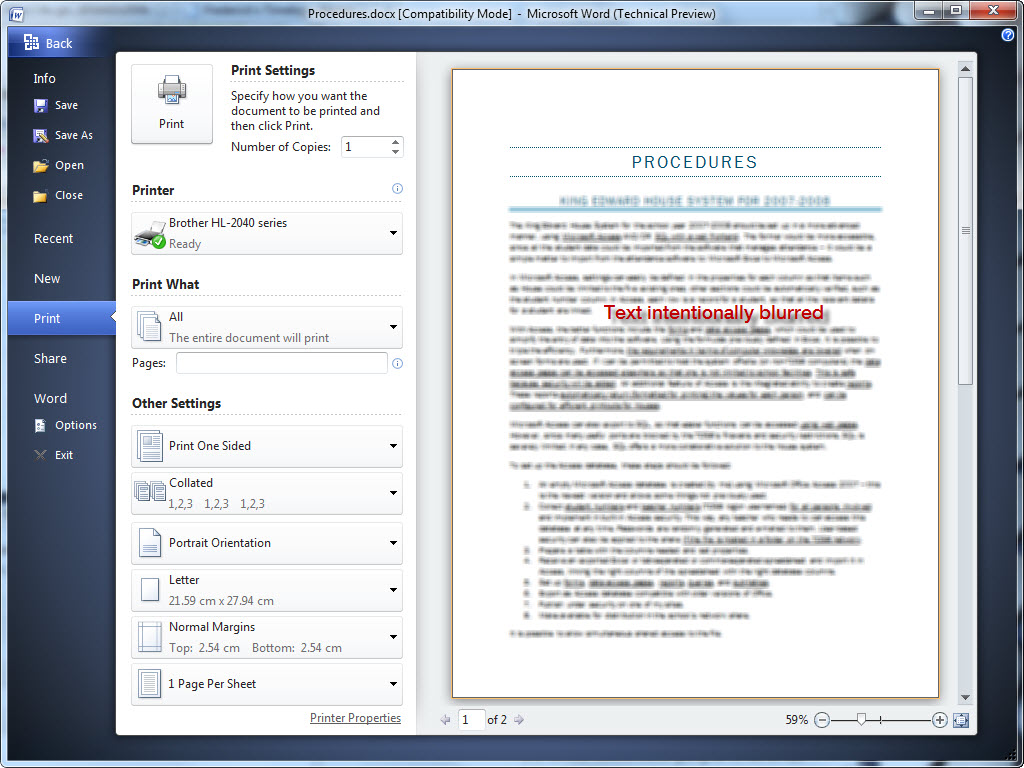
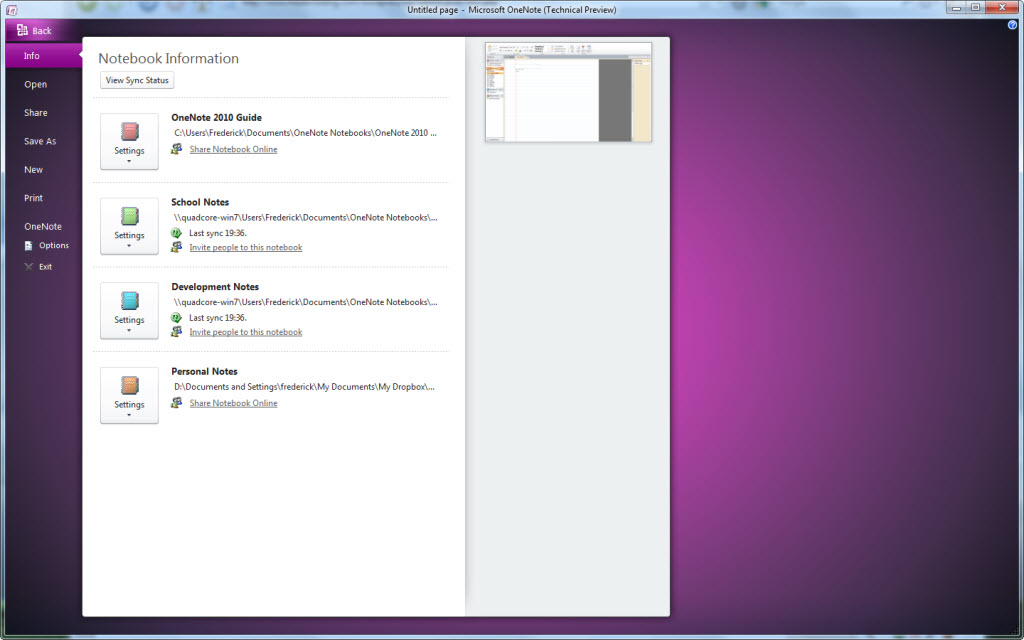
Indeed, Office 2010 is even prettier than Office 2007, at least in my opinion. The splash screens are now animated, as demonstrated below.

Please enable Javascript and Flash to view this Flash video.

On Windows 7, the titlebar blends seamlessly into the application, taking the Office 2007 look a bit further by merging it with Aero Glass. It’s a nice change.

Applications with the ribbon now integrate seamlessly into Aero Glass on Windows 7

Applications with the ribbon now integrate seamlessly into Aero Glass on Windows 7

Tip: on my blog, you can click on any image that links to the picture to see a larger version.

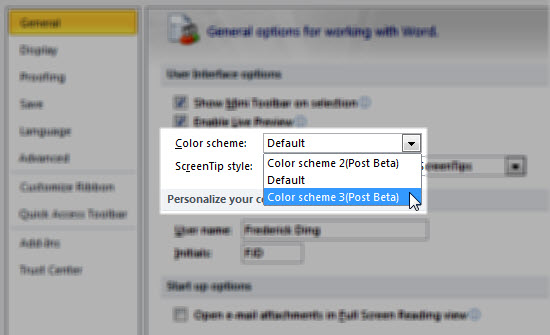
Some people don’t like how the colour is now white, but I don’t mind it at all. I just wish the colour schemes were actually available. In Office 2007 there was a choice between Blue, Black and Silver.

Seems the colour schemes aren't available in the Technical Preview

Seems the colour schemes aren't available in the Technical Preview

Ribbon, Ribbon Everywhere

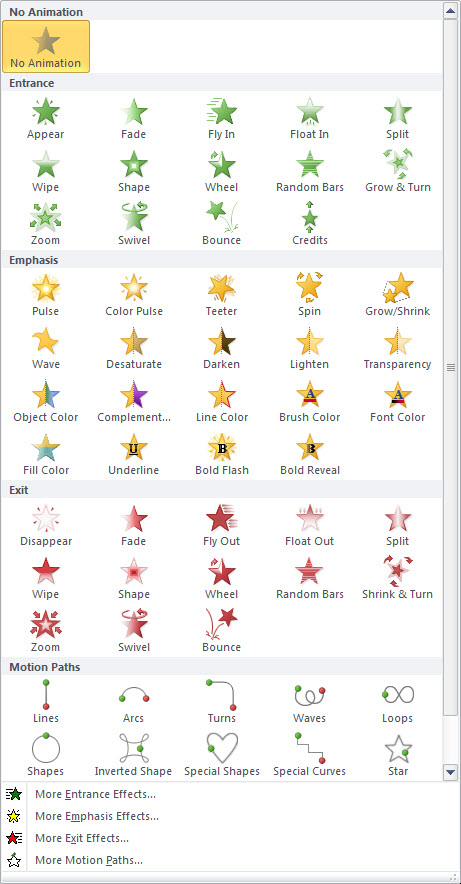
The ribbon (also known as the Fluent UI) is now extended to Outlook and Publisher as well. (In Outlook 2007, messages and composing would take place in a window with the ribbon, but the application itself was ribbonless.)

Outlook 2010 has a ribbon now

Outlook 2010 has a ribbon now

Unfortunately, the ribbon seems to complicate Publisher, allocating valuable screen space (of which people have tons these days) to tools that will be used once or twice in the life of the workflow.

Too much space is dedicated to the colour schemes

Too much space is dedicated to the colour schemes

More follows the jump. More »

Office 2010 Technical Preview: Part 1

July 16th, 2009 | 2 Comments | Posted in Computer Matters

This is the first part of my posts about Office 2010. Last night, I received an invitation to the Office 2010 Technical Preview, and today, I am attempting to install it on my Windows 7 RC machine.

Legal notice: since this isn’t a private beta, I am allowed to discuss the preview and my experiences with it. However, I am not allowed to share product keys, installer files, and documents to which I have access by virtue of the invitation. The contract that binds me with reference to the technical documentation quotes as follows:

You […] agree: (a) to refrain from disclosing or distributing the Confidential Information to any third party for five (5) years from the date of disclosure of the Confidential Information by Microsoft to Company/You; (b) to refrain from reproducing or summarizing the Confidential Information…

Thankfully, there’s a public pressroom for Office 2010 information, from which I was able to get equivalents of the stuff in the confidential documents. Here’s some information for you.

System Requirements

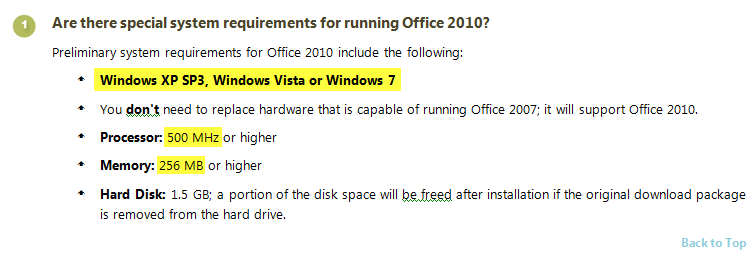
Office 2010 is designed to work on computers with very limited resources; after all, many businesses were concerned that they would once again need to upgrade their hardware. Office hasn’t really necessitated hardware upgrades in the past; Office 2003 ran very well on old Dell OptiPlex machines on Windows 2000, and Office 2007 ran quite well on older XP laptops.

The specific details are in the FAQs document.

Office 2010 System Requirements; click to see full image

Office 2010 System Requirements; click to see full image

The installers are rather compact; the Technical Preview 32-bit/64-bit installers for Office 2010 Professional are no more than 600 MB each.

64-bit editions

I’m currently on Windows 7 RC 64-bit edition, but I resolved ultimately to install the 32-bit edition of Office 2010. This is due to the following reasons:

  • The 64-bit edition of Office 2010 does not support most add-ins.
    Users of software with add-ins in Office programs will find that most of them do not work with the 64-bit edition of Office 2010. Software vendors are expected to release newer 64-bit add-ins, but users must use the 32-bit edition for compatibility with older add-ins.
  • One cannot upgrade Office 2007 to Office 2010 64-bit.
    According to the technical documentation, “2007 Office system cannot be upgraded to native Office 2010 64-bit.
  • I don’t work with spreadsheets greater than 2 GB in size.
    The documentation listed a number of benefits of using the 64-bit edition. The central point was being able to open large Excel spreadsheets. Since I don’t do this, the benefits of the 64-bit architecture are insignificant when it comes to Office 2010.

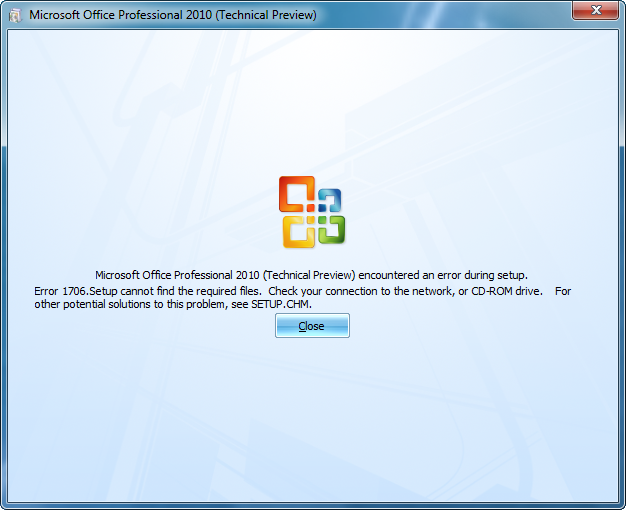
Screenshots of my installation will come in the next installment of these posts. That is, after I manage to install it. At the moment I’m getting the following error with the 32-bit installer, after customizing the install and even going through a few minutes of the installation progress bar.

The error I'm getting with the installer

The error I'm getting with the installer

If this persists with the 32-bit installer, I may have no choice but to try the 64-bit installation.

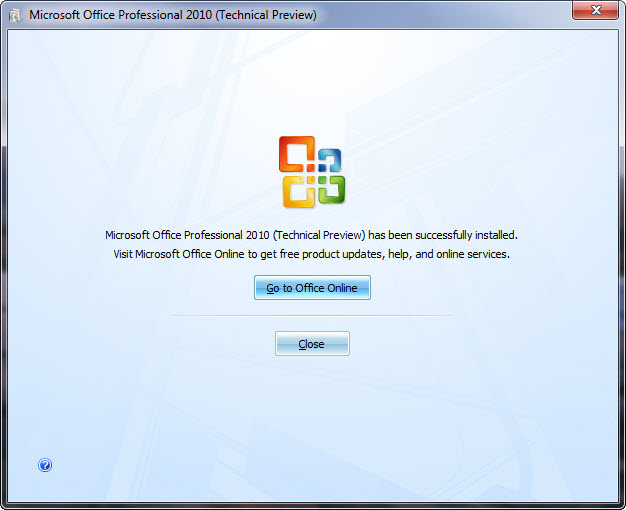
Update: the installer has now succeeded. More will be coming!

Finally, I've managed to install it.

Finally, I've managed to install it.

Update: Part 2 is here, with screenshots and commentary on interface improvements!

VIPRE – Another Antivirus Product?

July 2nd, 2009 | 1 Comment | Posted in Computer Matters

I’m usually sceptical of new antivirus products advertised to be both ‘fast’ and ‘effective’. But after receiving an offer from Sunbelt Software to inform readers about their new product — VIPRE® Antivirus + Antispyware — I had to investigate.

VIPRE claims to be “high-performance security software” that performs better than traditional suites like Norton Antivirus. That much is very believable; after all, we all know how clunky and laggy the established ‘leaders’ in antivirus are. But my personal antivirus favourite is ESET NOD32 — and I’ve always gotten the impression that it’s fast — so I was really surprised that internal testing showed VIPRE to be even faster and more resource-efficient than NOD32.

VIPRE: Scan in Progress

VIPRE: Scan in Progress

At this point I wanted to see what some credible sources had to say. CNET UK had essentially the same reaction that I had when first presented with this product: “never heard of it.” But after their own use, they had this to say: “we’re pretty impressed and will continue to use it — particularly on netbooks, which don’t have much power to spare.”

Credible sources that give software positive reviews always influence me. That’s why I think (and this personal opinion isn’t influenced by the sponsorship of this post) you should try Sunbelt’s new Antivirus Software, especially if you don’t have antivirus software already. Install the 15-day trial and decide for yourself whether it’s worth using. (I would have done the same myself if I had another PC to use for testing.)

Sponsored by Sunbelt Software

Browsers on Windows 7

June 14th, 2009 | 6 Comments | Posted in Computer Matters

A few days ago I completely reinstalled the operating system on my computer in order to upgrade from the Windows 7 Beta to the Windows 7 Release Candidate. In doing so, I had to manually reinstall all of my applications, including the various browsers to which I am accustomed — Mozilla Firefox (3.5 Beta 4), Google Chrome (dev branch), and Safari 4 (now no longer beta) in addition to the built-in Internet Explorer 8, which I seldom use.

I am also accustomed to my taskbar being set in “Combine when taskbar is full” mode, which is a compromise between the dock-resembling Windows 7 taskbar and the older taskbar style with which XP and Vista users would be familiar. This looks something like this:

An alternative taskbar look for Windows 7

An alternative taskbar look for Windows 7

Today, I decided to see if I could get accustomed to the Windows 7 taskbar look, which involves taking out those labels and showing merely the icons. Screenshot by Paul Thurrott:

The default Windows 7 taskbar style

The default Windows 7 taskbar style

This is when I discovered something cool yet shocking about my browsers.

Firefox in the taskbar

Firefox in the taskbar

Mozilla Firefox is a nice browser; that’s why I use it most of the time. Google Chrome is lightweight, fast, and aesthetically pleasing; that’s why it’s my default browser.

But neither of them seem aware of Windows 7. Their browser icons are plainly represented in the taskbar, even when I’ve got multiple tabs open. In the screenshot to the right, Mozilla Firefox only gets one taskbar thumbnail when I mouse over the icon, even though I have 4 tabs open. The icon, too, doesn’t reveal anything about how many tabs are open.

Chrome has the same issue

Chrome has the same issue

With Google Chrome, the exact same thing happens. The thumbnail is one of the application, not the individual tabs open, so it would appear that Windows 7 isn’t aware of the individual tabs nor is Chrome taking advantage of the new taskbar.

Internet Explorer has no issue with this; as soon as more than one tab is opened, the taskbar reflects this change. Note: the same change occurs for Chrome and Firefox if multiple WINDOWS are opened.

Windows 7 recognizes tabs in Microsoft's browser

Windows 7 recognizes tabs in Microsoft's browser

The shocking thing is, Apple’s new browser takes advantage of the taskbar. Perhaps one expects this from a company that focuses on user experience and aesthetics. But this just makes Safari awesome.

The taskbar actually recognizes the individual tabs in Safari 4

The taskbar actually recognizes the individual tabs in Safari 4

You’ll notice that the thumbnails aren’t of the browser, but of the individual pages loaded in tabs. This means that I can click on a thumbnail to go directly to that tab — an excellent convenience, thanks to the Windows 7 taskbar.

I’m very surprised that Mozilla Firefox and Google Chrome, two of the most common browsers among people who are on the cutting edge of software technology, aren’t taking advantage of Windows 7’s new taskbar. After all, according to Wakoopa (which tracks software usage), Firefox and Chrome are the 1st and 3rd most used browsers on Windows. Come on, Mozilla developers, make your browser more Aero-aware and taskbar-aware! Even Chrome looks nicer on Aero Glass by default.

Chrome looks really attractive with an Aero Glass interface

Chrome looks really attractive with an Aero Glass interface

Taskbar thumbnails are really useful when the taskbar items don’t have labels and when the icons are combined. It’s no longer necessary to read the labels to determine which item to click on; I can just mouse over, quickly scan over the thumbnails, and click on the one I want. Kudos to the people at Microsoft who came up with this intuitive interface!

If you’re still on Windows XP — noting that it is nearly 8 years old — or on Vista, Windows 7 is a major step up in terms of the user interface. It might take a bit of adjusting, but in the end, I am certain you’ll like it.